Meshy 7: All the Fingers and Toes


Generative AI modeling has come a long way from three-fingered Shrimp Jesus in an incredibly short time. Meshy 7 launched in mid-August, promising to solve the biggest hurdle in AI design: geometry alignment and structural fidelity. It’s definitely better, but it’s not quite as good as human art. Yet.
Previous versions of Meshy produced 3D models that looked good from the front, but disastrous from the back. Meshy 7 introduces a multi-scale image encoder and refined dataset pipeline to create more precise silhouettes, supposedly to eliminate warping and deliver production-ready accuracy.
Meshy AI is free to try, with 100 credits and access to basic features, but you’re not allowed downloads, and anything you generate is public with a CC BY 4.0 license (commercial use with attribution). Paid plans start at $20 a month for individuals and $70 for teams. Accounts start with 1,000 monthly credits, and you can earn more credits by sharing your models and following popular creators on the app, and spreading the joy of Meshy on social media. You can also earn 300 credits just by completing a set of tasks that are essentially a tour of Meshy’s capabilities. You can also purchase extra credits for cash. Currently credits are on sale, starting at 250 credits for $8 or 3,000 credits for $60.
You can subscribe on a month-to-month basis, or save a considerable amount by committing to a year. Your subscription credits will reset each month, but credits earned through rewards or purchased with cash never expire.
I ran tests on Meshy 5 in 2025, and the app has grown by leaps and bounds since then. It’s still not perfect, but it is remarkably good for generating decent models you can take straight to your 3D printer.
It’s important to note that 3D printing wasn’t the original focus of Meshy, or any of the other generative AI modeling apps. These programs were designed primarily for game designers or concept artists. In the early days, Meshy could get away with a rough, blobby mesh, so long as the texture laid on top contained an impressive amount of detail.
The focus has expanded to include users who want to bring their AI creations into the physical world. This requires more detail, more accuracy, and more mesh.
For full disclosure, I have a personal account with Meshy, but the company granted me an extra 1,000 tokens to test out all the features. I’ll admit to having a bit of a love-hate relationship with AI design. On the one hand, I’m a terrible designer with no time to learn complicated programs like Blender. On the other hand, I need full color designs to beta test the HeyGears UV 3D printer, which has precious few full color models preloaded in its slicer software.
My archives contained a lumpy dog model from the 2025 testing, which I immediately recognized as my puppy’s first photo. I didn’t bother printing this model.
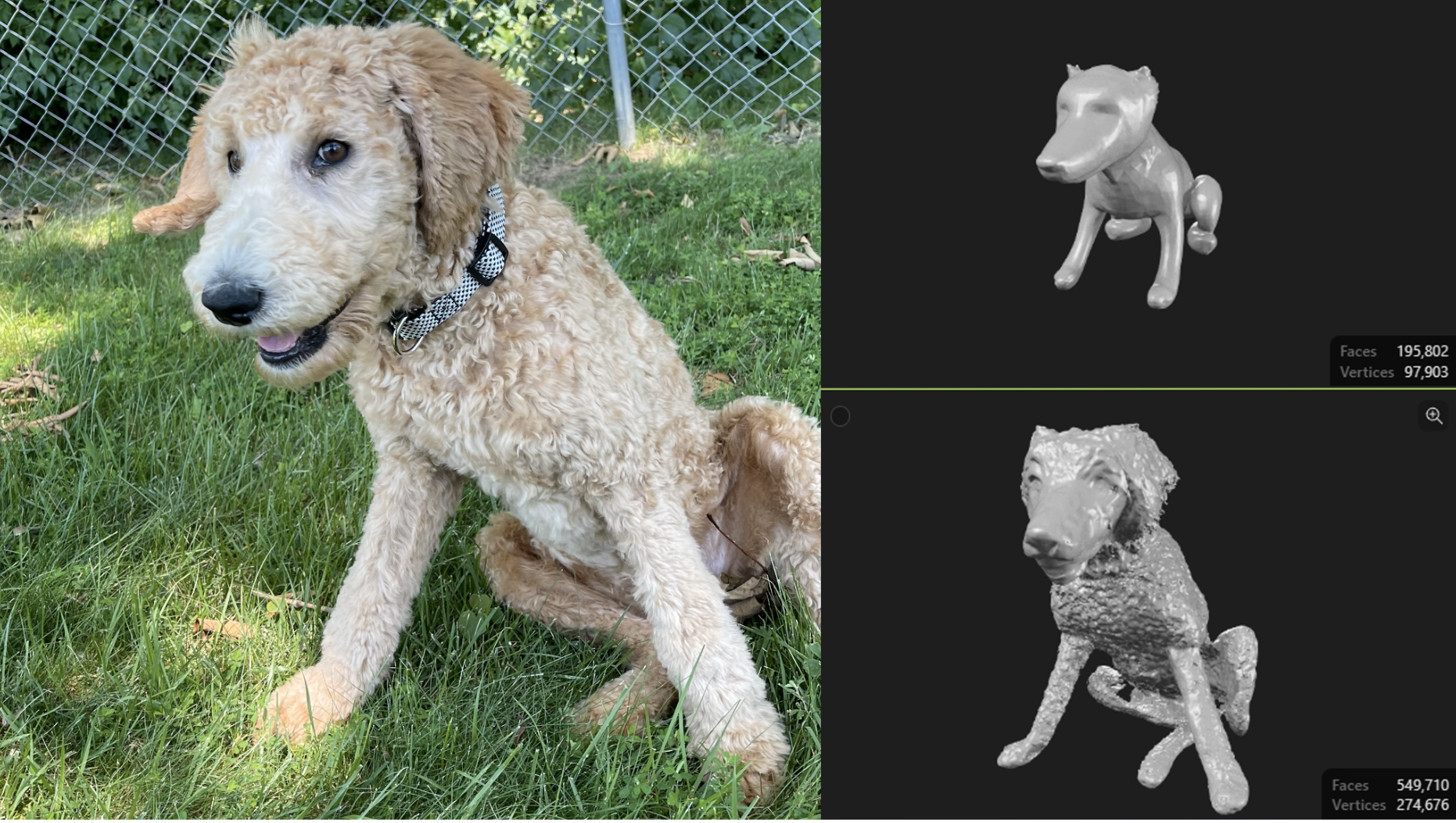
A model made in 2025 with Meshy 5.
Last year’s attempt was so bad, I gave up on AI modeling. But Meshy 7 is immensely better. I ran the same photo through, and my scruffy puppy was turned into a fluffy mutt with one tail, four legs, a toothy grin, and a collar.She lost some of her puppy charm, and Meshy hallucinated a leash on the first try, but this is far better than last year’s mangled, eyeless nightmare. When I asked for texture, the AI dog looked significantly more like Ripley, with proper shading in her eyes and the exact pattern of her collar.
The texture that Meshy 7 generates is usable as is for 3D UV printing, something that will come in handy as printers like the HeyGears G1X hit the market. It can also “dumb down” the color for FDM prints. This process breaks the color into 2 to 16 simple shades that Bambu Studio or Orca Slicer can understand. Currently, PrusaSlicer does not understand the color textures generated by Meshy in either OBJ or 3MF.
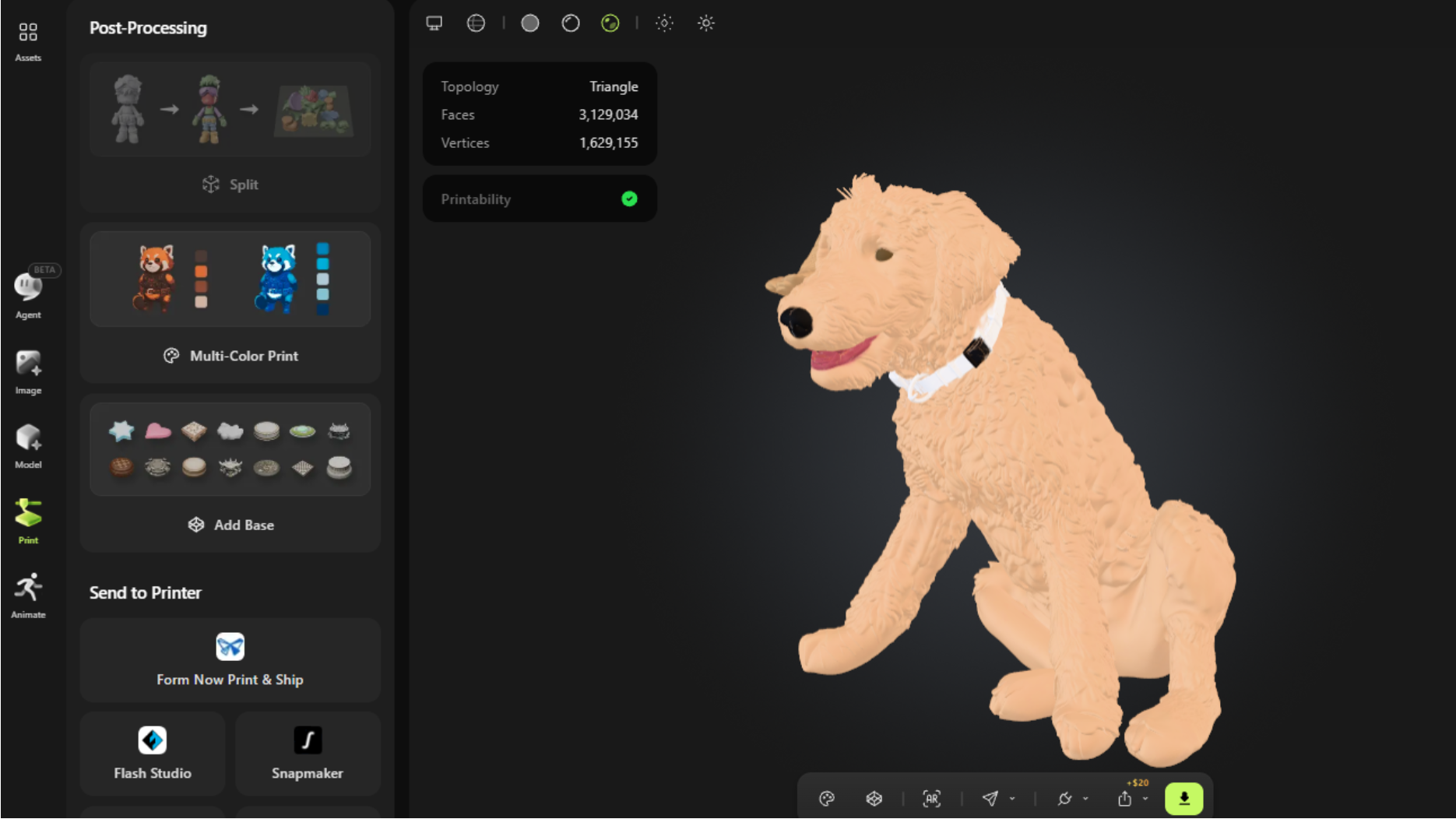
Meshy can also add a platform to your model to help it print well. I only needed to touch up the color mesh in Bambu Studio before slicing it with a .08 layer height using Bambu Studio’s High Quality profile and organic supports. This was printed in five colors (tan, silver, black, white, and red) on a Bambu Lab H2C. The resulting print is 60 mm tall and took 9 hours and 7 minutes to print in PLA. The fur is uneven and the teeth are a bit abstract, but that is most definitely my dog.
I’ve spoken to a few 3D designers who begrudgingly admit that AI models could be a starting point for human designed work. A good artist could have tidied up this model to make a strikingly realistic portrait.
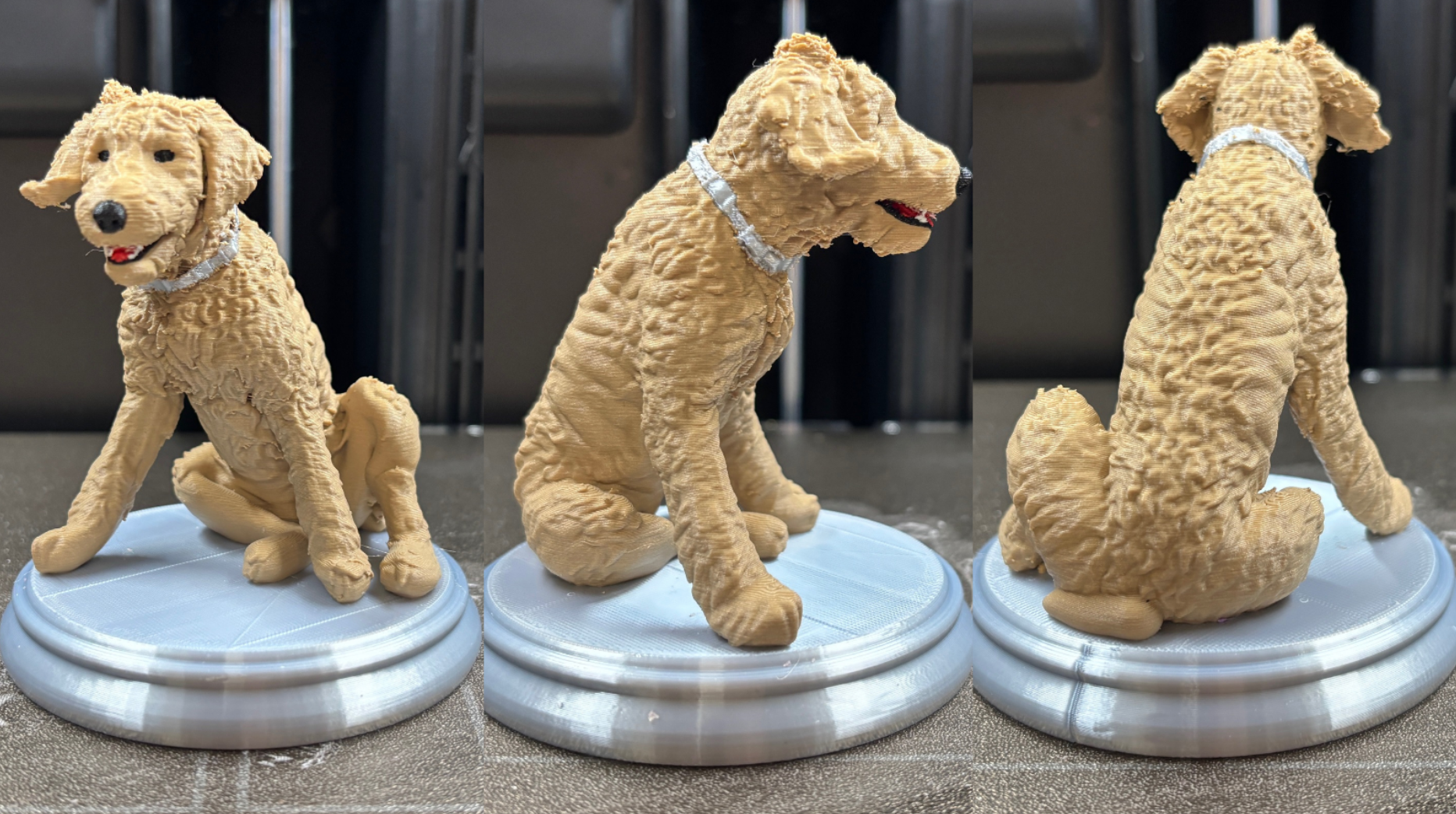
Meshy 7 has three main modes: text to image, image to model, and AI Agent. The first two are fairly obvious: feed the app words and it makes a 2D image. Give it one or more photos and it makes a model. The AI Agent, added last June as a beta, is all that and more. It allows you to interact conversationally with Meshy, and once you start treating the machine like an assistant, you get vastly superior results.
While Meshy is necessarily a pay-to-play program, you are allowed to chat with the AI Agent to flesh out your ideas, free of charge. You can even ask the AI how to make your models more cheaply, and it cheerfully suggested I turn on a permissions setting where I would need to approve all future generations before being charged tokens. It also suggested making a series of cheaper sketches and examining them closely before moving on to models. The app can use gpt-image-2, nano-banana-pro, nano-banana-2, and nano-banana-lite, with nano-banana-lite being the cheapest and fastest model to use.
In fact, I asked Meshy’s AI why it made better models, and it explained that it wasn’t more accurate, but more coherent. The AI cleans up your input first, erasing backgrounds in photos and normalizing the lighting. It can then ask you a series of questions regarding the model to clarify your intent. For example, it will ask if you’re looking for a cartoon or photorealistic model. Then it will generate a 2D image and ask if you need changes. Finally, you proceed to the 3D generation, make corrections if needed, and add the color and texture.
You’re also allowed four free retries on each model. You should download a model before hitting retry, as there is no “undo” button.
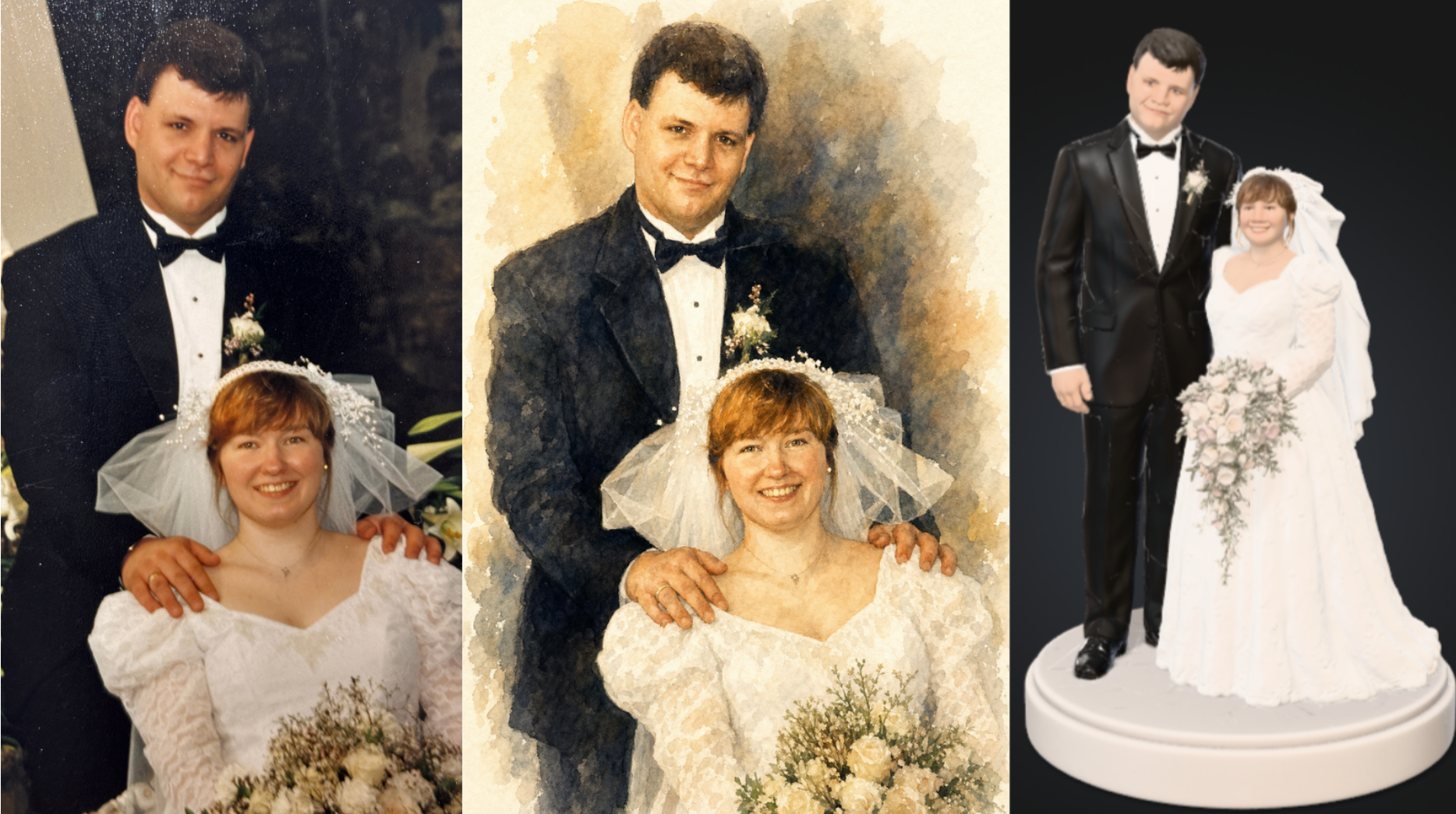
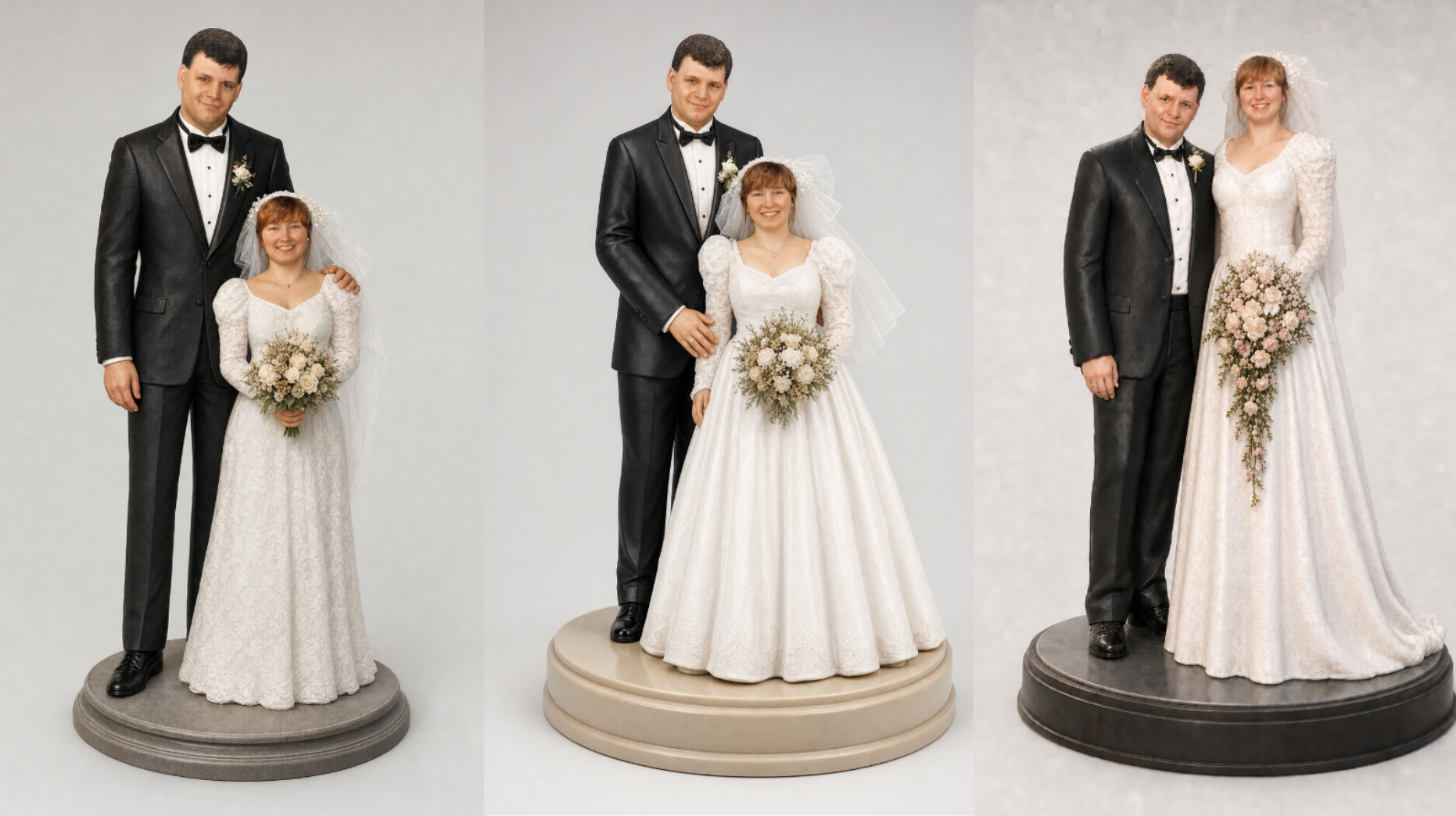
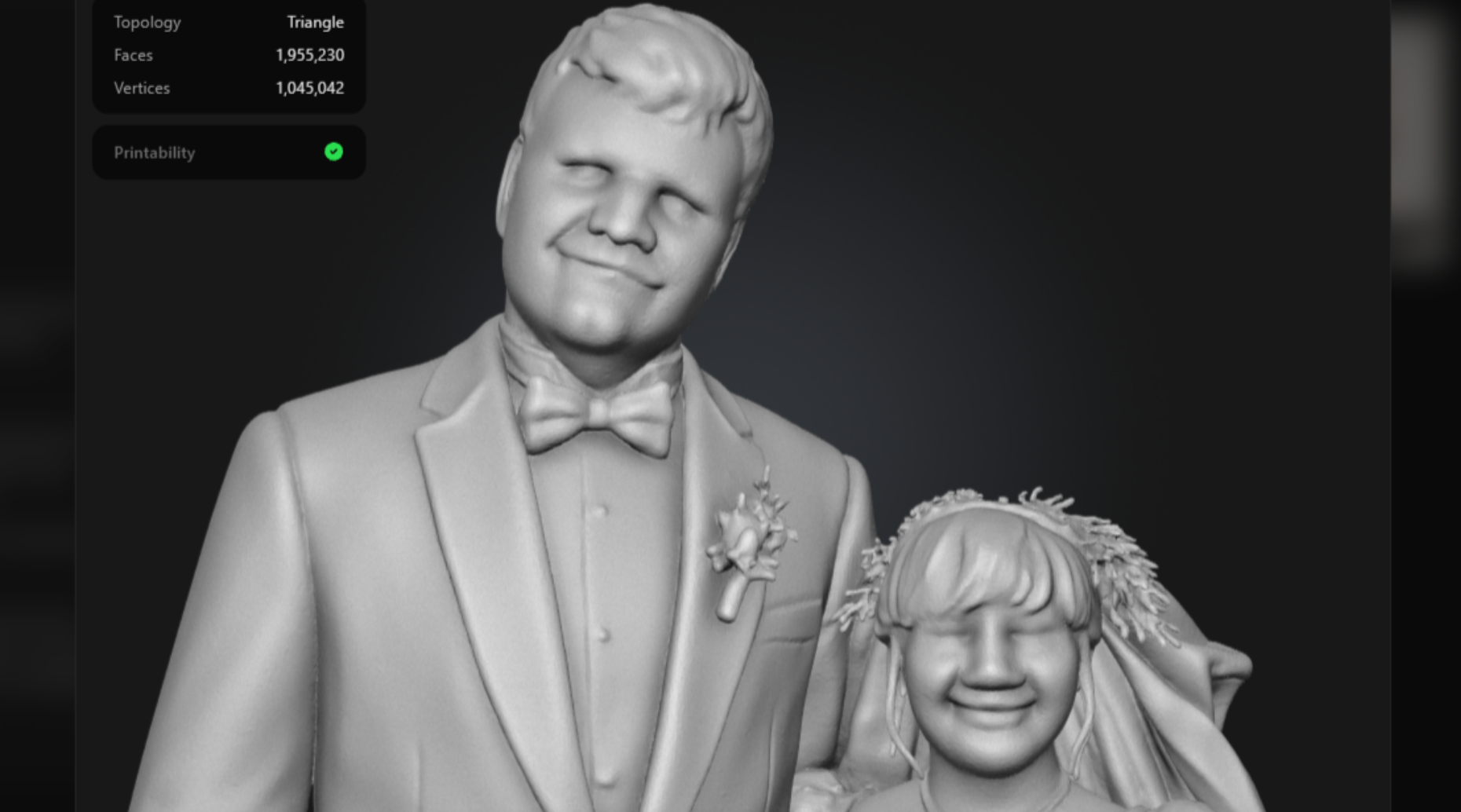
Though Meshy is primarily for 3D images, the AI Agent can do surprising things. For example, I pulled out my wedding album, took a photo with my iPhone of one of the glossy 4×6 photographs, and asked, “What can you do with this?” I was expecting a 3D model, but it first complimented the image – flattery will get you everywhere – then suggested it could create a watercolor keepsake. Below is my iPhone image, the watercolor, and finally the 3D model it created. Not sure it really did my groom justice on the 3D render, but I don’t look half bad.
And I think this is one reason that the AI Agent is your best bet. When you’re making a model from old photos, you don’t have the luxury of hopping in a time machine and getting your subject to do a Front – Left – Right – Back series of photos that the standard image generator needs. However, I did spend nearly an hour trying to get it to render my height correctly, as I was seated in the photo. The AI admitted to doing the math wrong when I informed it I am 5’2” and my husband is 6’4”.
I did another quick photo experiment, using ten-year-old iPhone images of my son and a dog who is no longer with us. Perhaps children in t-shirts and non-specific mutts are easier to generate?
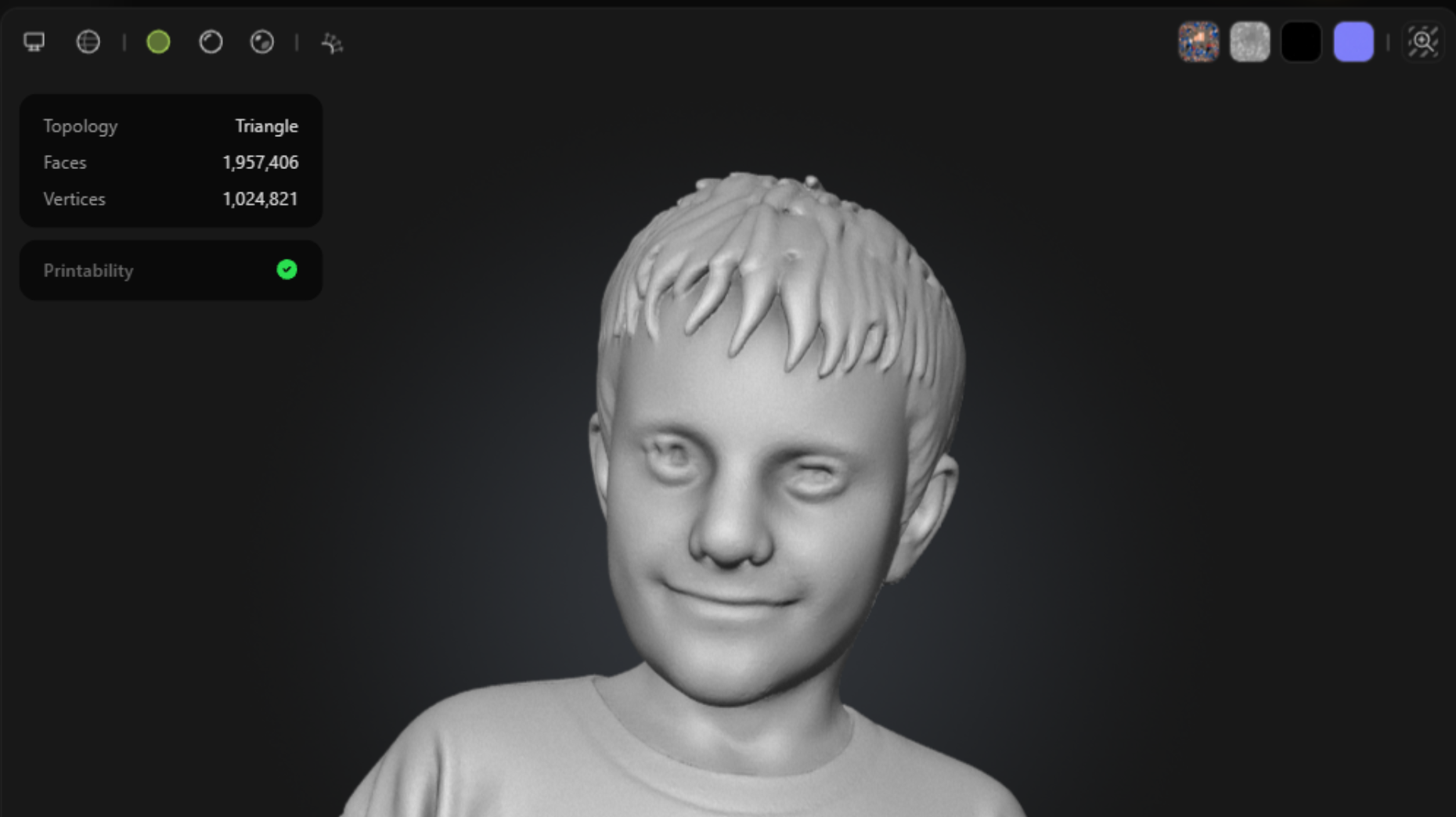
Below is the photo, the 2D image render, and a screenshot of the 3D model with texture that Meshy 7’s AI Agent created.
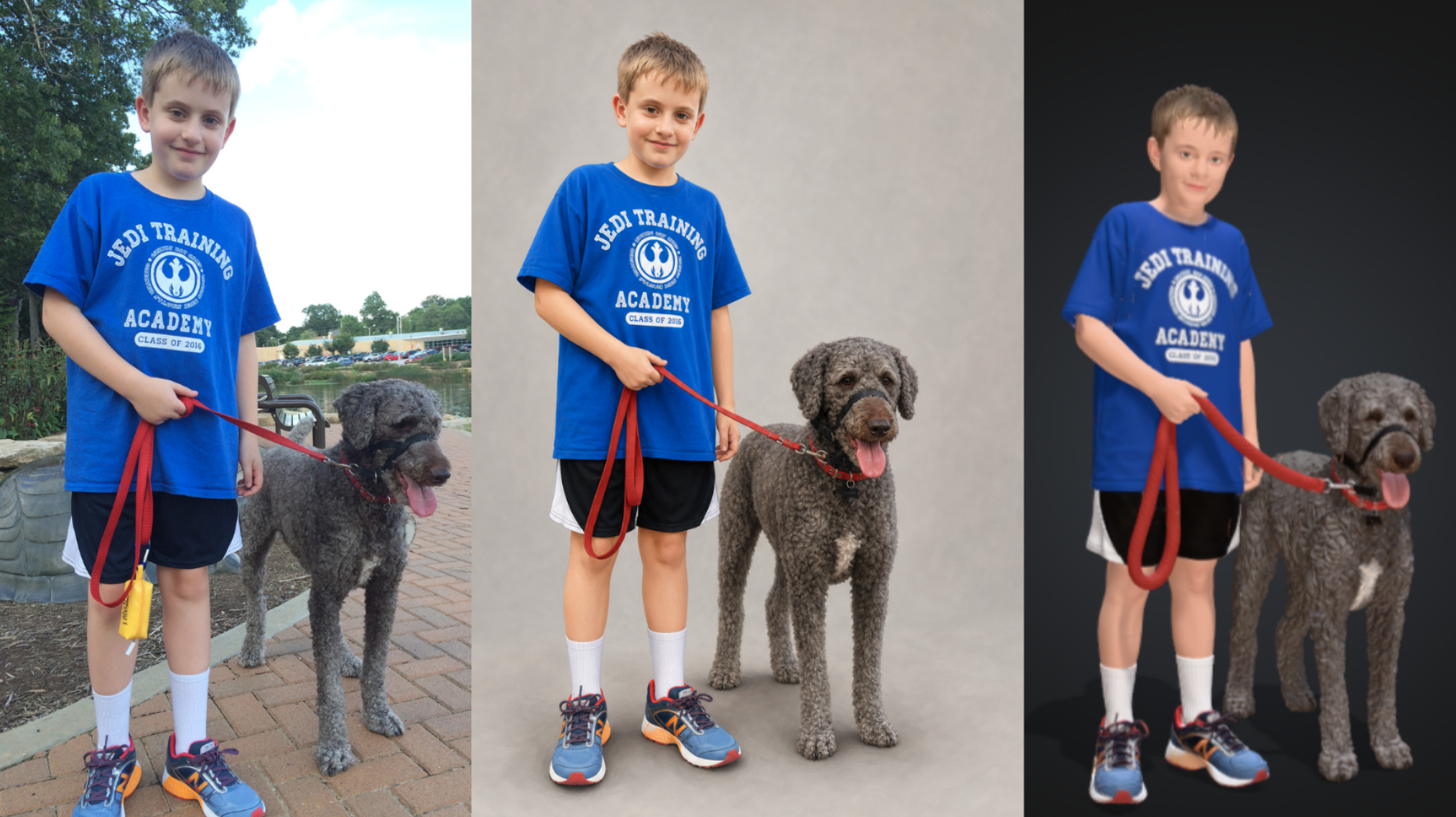
The model has a few details that may not matter to the average user, or could be cleaned up by an artist with a modest amount of skill. The hands have enough fingers, but one has a bit of fur on it. The dog’s collar is a bit malformed. And most interesting, the AI forgot how to spell “Academy” between the 2D and 3D renders.
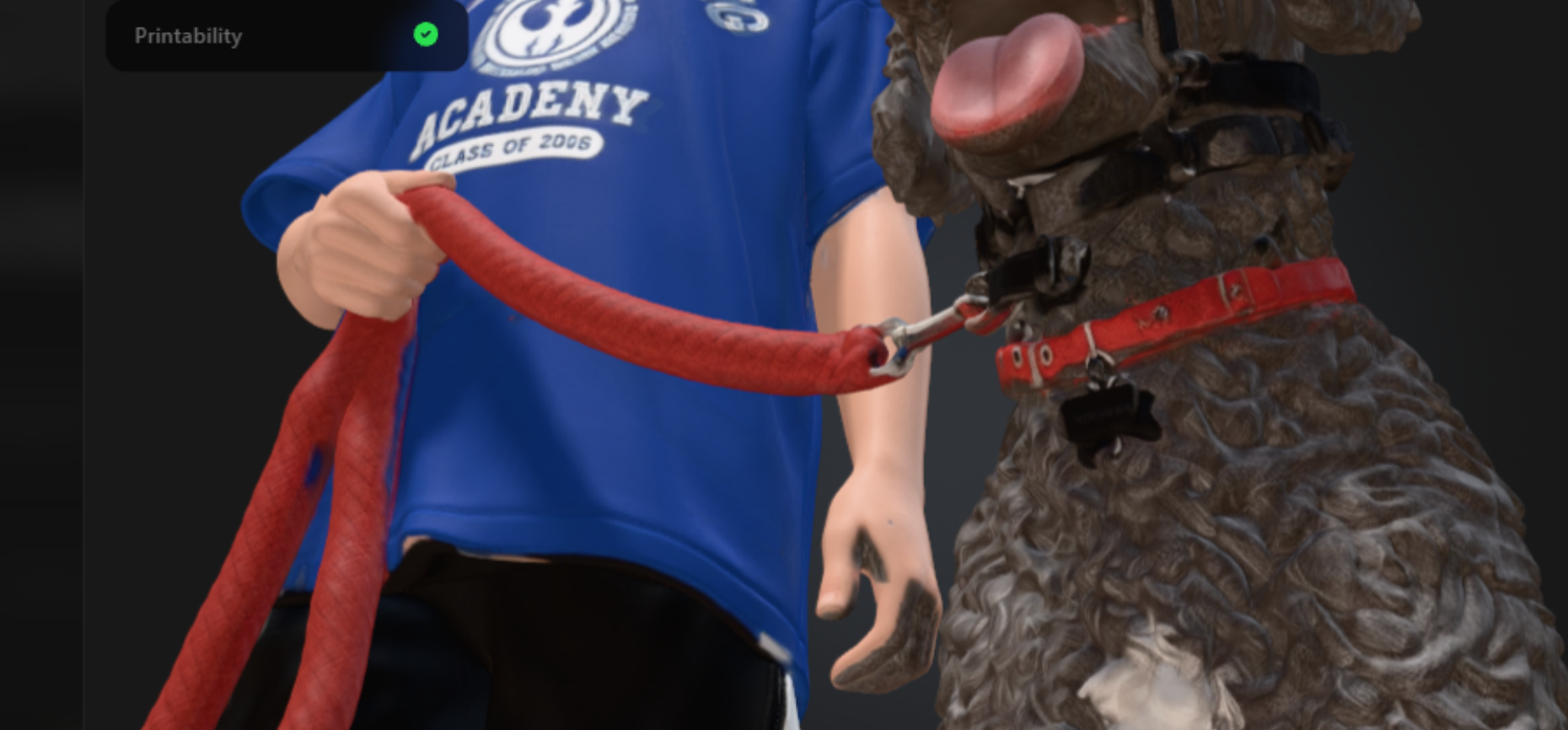
Faces, especially eyeballs, are also…problematic for 3D renders, and will require touchup if you’re taking these models to an FDM or resin printer. It turns out a lot of poor detail can be covered up with a good color texture.
Generative AI isn’t going to replace talented human artists anytime soon, despite what people may say on social media. But Meshy 7 makes a solid case for its adoption into your 3D workflow, and I found the AI Assistant to be incredibly helpful when coming up with designs. Even if it couldn’t figure out where to put my eyeballs.
Images courtesy of the author
Subscribe to Our Email Newsletter
Stay up-to-date on all the latest news from the 3D printing industry and receive information and offers from third party vendors.
Print Services
Upload your 3D Models and get them printed quickly and efficiently.









You May Also Like
Russia’s 3D Printed Missiles & Can NATO Get Its Act Together?
For most of US history, however much the two major parties differed on domestic policy (in some cases a lot, overall less than you’d think), there was always essentially a...
3D Printing News Briefs, October 21, 2026: Digital Twins, AI CAD Service, AR Smart Glasses, & More
In today’s 3D Printing News Briefs, America Makes announced the winners of its MIAMI Project Call, and AM Europe released a new report. Artec 3D launched its new Artec Twins...
3D Printing News Briefs, October 10, 2026: Drones, WAAM, Ceramics, & More
We have a packed 3D Printing News Briefs for you this weekend! First, America Makes celebrated the recent National Manufacturing Day with 3D printed drones, and then it’s on to...
The Manufacturing Race Behind the Drone Revolution
We are in the middle of a major manufacturing shift focused on the production speed and payload capacity of uncrewed aerial systems (UAS), or drones. A recent Manufacturing Dive article...