Upgrade Your Inexpensive 3D Printer with this Instructables Hack


Instructables contributor “Deividmaxx”–real name, David–wanted a high-precision 3D printer but he didn’t want to pay an equally high price, so he decided to buy an inexpensive, build-it-yourself 3D printer kit from an online retailer who had already gone to the trouble of sourcing all of the parts, and then let the thing remake itself with a bit of help from its owner.
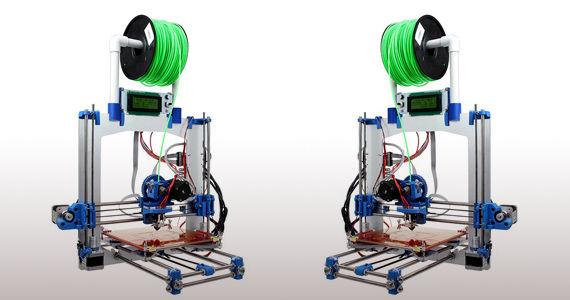
Mirror image photograph of David’s original Prusa i3 built from the inexpensive kit.
David, who has been passionate about robotics and electronics since his mid-teens, shared a couple of previous Instructables projects–a “DIY Handmade Hexapod with Arduino,” a six-legged, crab-like robot he dubbed, “Hexdrake” and an accompanying remote control device for his robot crab–before submitting his most recent and far more complicated 3D printer upgrade.
Evidently, 3D printing is an additional passion and clearly an area in which David has considerable expertise as his most recent Instructables post suggests. His latest project involved converting a lower-quality 3D printer to a “high precision dual 3D printer.” When he was making Hexdrake, David realized it would be much easier to create moving parts for the device with a 3D printer. Of course, he knew that having a 3D printer would be a huge boon to his electronics- and robotics-oriented projects in general.

David used SolidWorks to design the improved parts for his 3D printer upgrade.
Once he had decided to acquire a 3D printer, David began the research phase of what became an impressive DIY project. He learned from his research in online forums, related web pages and so forth that he could purchase or, better yet, build himself. He heard about the Prusa i3, the latest 3D printer by core RepRap developer, Josef Prusa. The printer–and variations on it–can be built with kits for home or business use and is partially self-replicating.
After deciding on the Prusa i3, David found a kit on the Chinese online electronics site, AliExpress. He assembled the inexpensive 3D printer and began using it but notice that the objects he printed were of pretty poor quality. He didn’t blame the printer design itself so much as the poor quality parts that he received in the kit he’d purchased. That’s when David began designing and customizing replacement parts for the Prusa i3, including, he explained, a “support for auto leveling, twin direct drive for the Bowden system, [and a] twin spool holder.”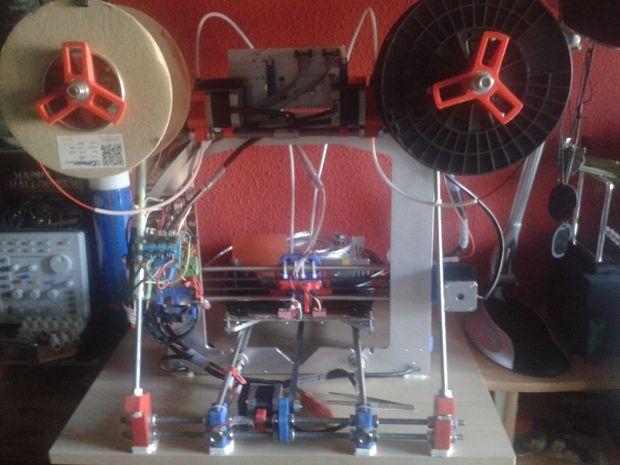
If you decide to take on this project from scratch or have your own Prusa i3 that you’d like to spruce up, note that while David is primarily concerned with creating a machine with a dual extruder, there is still a great deal of helpful information in the Instructable with respect to configuring a 3D printer with a single extruder.
David began the upgrade using his functioning Prusa i3. He used SolidWorks to design all of the 3D printed parts he felt required refinement. Ironically, all of the new-and-improved pieces were printed using the poorer-quality Prusa i3. He sanded and cleaned the newly-printed parts and then began the assembly of the upgraded 3D printer. There are multiple supplies lists depending upon which step you’re working on, so make your shopping list only after reading through all 17 steps of David’s Instructable.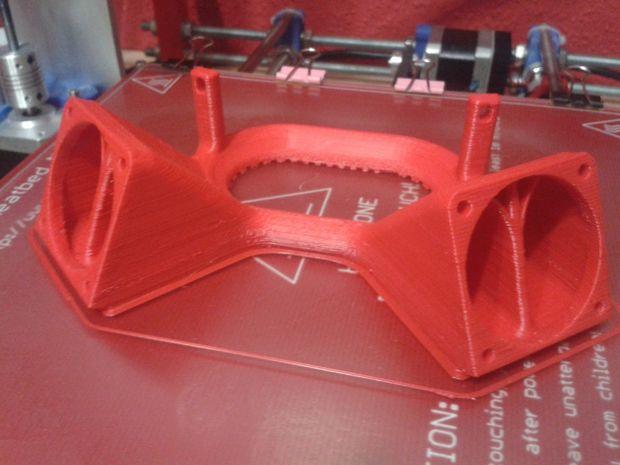
For those intrepid DIYers who wish to take on a complex but ultimately rewarding project like this, note that you’ll also have plenty of assistance via detailed instructions from David on setting up the firmware and software, including Marlin 1.0.2, 3D printer firmware, Repetier 1.5.5 (provides support for multiple extruder printing, supports multiple slicers, and more), Slic3r (G-code generator), and Octoprint (using a Raspberry Pi 2).
Thus far, there haven’t been any comments on this Instructables project but, as it is a more complicated and expensive (well, relatively speaking) one, we imagine it may be a while before we hear feedback from other 3D printer DIYers, including those submitting ideas for further refinements. Meanwhile, we hope David will share some images–or additional Instructables projects–of objects or devices he’s made using the upgraded, high-precision printer.
Discuss this story in the Prusa i3 Upgrade Forum thread on 3DPB.com.
Subscribe to Our Email Newsletter
Stay up-to-date on all the latest news from the 3D printing industry and receive information and offers from third party vendors.
Print Services
Upload your 3D Models and get them printed quickly and efficiently.










You May Also Like
The Two Paths to AM Print Services Market Growth
AM Research New market research: AM Research is building its new Additive Manufacturing Services Market 2.0 model. Learn more about the report and preorder here → Things continue to heat...
Additive Manufacturing Has a Major Growth Opportunity; Trust Will Decide Who Captures It
After years of overpromising, the next phase of AM growth will be won by companies that consistently deliver what they say. When I entered additive manufacturing in 2014, after 15...
10 Years of Multi Jet Fusion: Onsite at HP’s Vancouver, Washington Facility
At this year’s RAPID event in Boston, HP Additive Manufacturing Solutions celebrated ten years in the additive manufacturing (AM) market. The company ushered in the milestone with several innovations, including...
ADDMAN to Buy Up to $10.8M in Nickel 718 Powder from 6K Additive Over 30 Months
After years of buildup, we’re finally starting to see what the US metal additive manufacturing (AM) market could look like at scale. To be sure, it’s still not quite there,...