Terrain2STL Lets Users 3D Print Topographic Maps from Google Maps Data

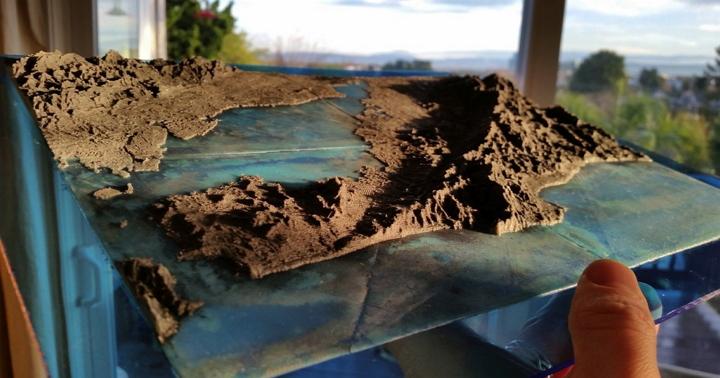 With their blend of art, science and implied adventure, maps have a way of pulling us in to their depiction of the details which make up our world.
And perhaps the most appealing of them, modern topographic maps, fascinate with their large-scale detail and representation of relief through contour lines. Traditionally, topographic maps show both natural and man-made features and they’re typically published with contour lines – lines which connect spots of equal elevation. From “chorographic maps” to “planimetric maps,” topographic maps are at the top of the heap, and the study of topography is a broad field which can take into account all natural and man-made features of a given terrain.
Now R&D Technologies, Inc. a New England reseller of the Stratasys line of 3D printers which also operates a fully equipped service bureau with in-house technology for 3D prototyping, has found an .STL file generator for exporting 3D data from Google Earth. Chris Richter, a Customer Support Manager and Application Engineer with R&D Technologies, wondered if there was a relatively simple way to print topographic terrain similar to topographic maps.
“After some searching on the web, it seems there is not an easy or straightforward path to accomplish this. I came across a tutorial on Youtube which shows how to import GoogleMap data in to Google Sketch-Up and then export the data for importing into Rhino,” he says. “Since I do not have access to Rhino, this solution was a dead end.”
But not to be deterred, Richter then did some experiments where he imported that Google SketchUp data into Meshlab, the free mesh editing utility. While that method did work on occasion, he was still not impressed with the consistency of the results…and then he stumbled on an ideal solution.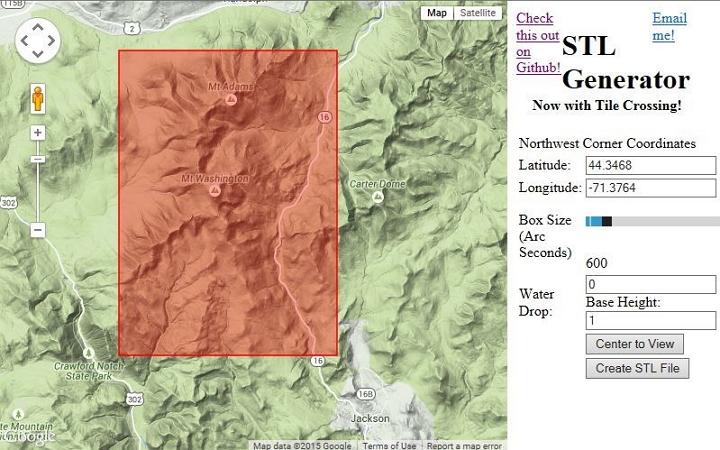
He found a very cool site by developer Thatcher Chamberlain called “Terrain2Stl,” and that did the trick. As we saw back in November, this STL Generator is pretty impressive.
Chamberlain’s site allows a user to position a bounding box around the area of a map they wish to capture. The box area can be defined by features of the site, and simply clicking a “Create STL File” button generates what is generally an error free .STL file.
Richter says that aside from areas such as the Grand Canyon, the models work well.
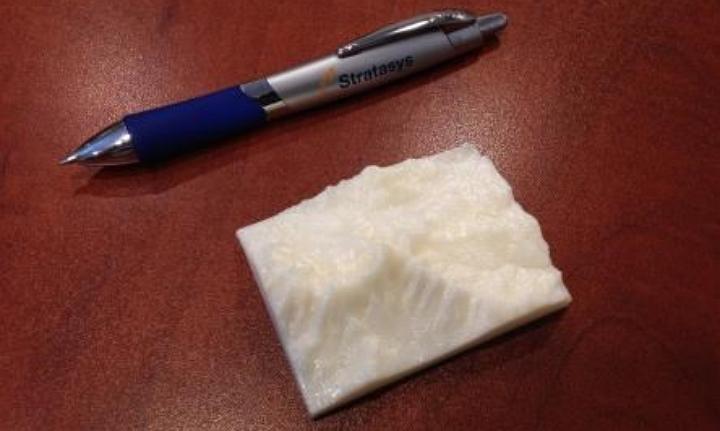
“Most mountain ranges I have tested seem to work well, although I noticed the Z scaling needed to be decreased by about .78 to create a realistic model,” Richter says. “I was able to create an STL file of Mount Washington which is located in New Hampshire and I then 3D printed the file on a uPrintSE Plus.”
He printed out a 2” X 3” example, and it looks mighty interesting indeed.
Subscribe to Our Email Newsletter
Stay up-to-date on all the latest news from the 3D printing industry and receive information and offers from third party vendors.
Print Services
Upload your 3D Models and get them printed quickly and efficiently.











You May Also Like
Cobra’s 3D Printed Golf Clubs Reveal What the Technology Can Do for Sports
When 3DPrint.com attended the PGA Show in Orlando this January, one booth stood out for a reason that had nothing to do with marketing hype or big-name tour pros —...
TCT Asia 2026: Empowering Asia · Connecting the World
TCT Asia, now in its 12th year, is more than just a 3D printing exhibition — it embodies its original concept: Time Compression Technology, a vision of making the entire...
3D Printing Financials: Healthcare and Aerospace Drive Growth at 3D Systems
3D Systems (NYSE: DDD) closed out 2025 with stronger performance in the final quarter, helped by growing demand for 3D printing in healthcare, dental, and aerospace applications. The company said...
3D Printing Financials: Stratasys Tightens Operations in Slow Market
Stratasys (Nasdaq: SSYS) is entering 2026 after a difficult year for revenue, but with tighter cost control and improved cash flow. The company’s latest financial results show that revenue remains...