3D to 2D: Using a 3D Printer to Draw in 2D

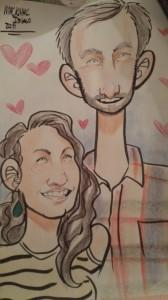
His neck isn’t actually that long.
Over the summer, my fiancé and I joined my family on vacation and spent a beautiful day on Mackinac Island, Michigan. While we were there, we had a caricature drawn to commemorate our visit. A crowd gathered as the artist worked away, and over the course of that half-hour we quickly became accustomed to passers-by looking at us, down at the easel, and then back to us, grinning or laughing or reassuring us that we’d love the finished product. While we did enjoy the drawing (it’s now framed in my office), watching the crowd watch the artist create it was easily one of the best parts of the process.
Watching production dates back as far as art does; I can just picture cave parties waaaay back in the day, and how all the cavemen would comment on how realistic the animals were, and how fetching the fertility goddess looked in a given rendition. And today, just do a quick search: YouTube is full of videos of people creating art. Sure, some of the viewers are art students who want to learn techniques, but the majority of views will come from people just watching.
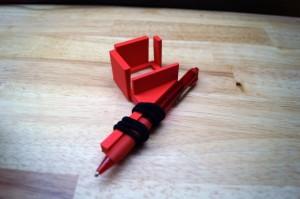
Kraft’s custom-made pen mount
In 2014, art takes all forms. We’ve seen some really great pieces of art recently made using 3D printers. But what about using 3D printers to create 2D art? Where there’s a will, there’s a way, as some clever 3D printer users keep discovering every day!
With a custom-made mount, a 3D printer can hold a pen; with custom settings on the printer, the pen attached to the printer can create… well, anything in 2D!
LulzBot user “bam” was inspired by a 2D printer marker mount and has developed and shared instructions for how to use a 3D printer for 2D printing; his mount is designed with a ballpoint Bic pen in mind, but is likely compatible with most other pens with similar shapes and sizes. With the right print settings, the pen will be held above the paper in such a way as to not over-saturate the paper. bam recommends using a high contrast jpeg image, a total print height set to 0.05 millimeters, first layer set to 0.01, and size set to work with your printer.
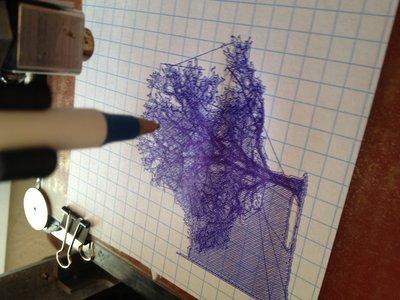
Caleb Kraft, of Make: Magazine, noted that this particular use of a 3D printer is “slightly silly,” though also that “watching something being printed in the style of a plotter has its charm.” He’s right: it’s very silly. But he’s also right: the process is charming, and it’s just fun to watch!
Check out the video below to watch the process.
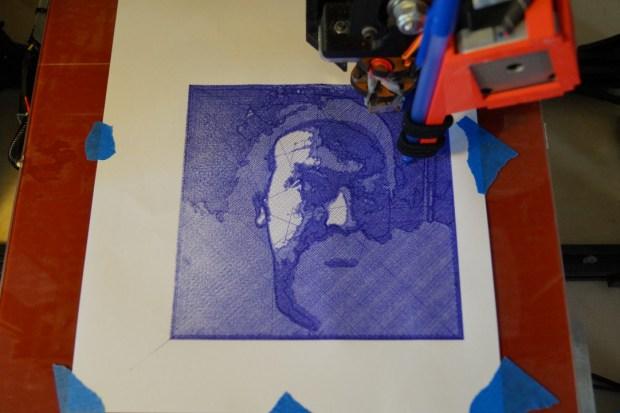
Some seriously neat designs can be made, too, though. As someone with approximately zero talent for drawing, I know I’d appreciate the chance to have pen “drawings” that I “made” (even if making in this process is computer aided, I think it still counts). The process is also reassuring: with the computer stepping in, no artist needs to worry about a stray sneeze derailing a line, or wondering just how to tackle intricate designs.
And the designs can be very intricate.
Trees, portraits, you name it: a 3D printer can be rigged to draw these up just for you! Have you tried doing this on your printer? Let’s see your work. Discuss in the 3D to 2D Printer forum thread on 3DPB.com.
Subscribe to Our Email Newsletter
Stay up-to-date on all the latest news from the 3D printing industry and receive information and offers from third party vendors.
Print Services
Upload your 3D Models and get them printed quickly and efficiently.








You May Also Like
AMPulse Asia: Creality IPO Headlines APAC 3D Printing Market Roundup
Asia’s additive manufacturing sector spent the back half of May moving capital and capacity, not just demos. Chinese desktop and consumer printer makers pushed onto public markets, metal powder producers...
Blue Origin’s New Glenn Explosion Comes During Major Manufacturing Push
Blue Origin‘s orbital New Glenn rocket exploded during a hot-fire test at Launch Complex 36 in Cape Canaveral on May 29, setting back the company’s launch ambitions at a time...
Aibuild Says New FETS Simulation Tool Is 10,000x Faster for AM
Aibuild has launched FETS for Additive Manufacturing, a Finite Element Thermomechanical Simulation tool that lets you simulate stress, distortion, thermal effects, and thermomechanical effects. The solution has been optimized for...
AI CAD Tools for 3D Printing: An Overview
There is a bevy of AI-to-CAD tools coming out. Some are finding users; some are raising millions in funding. Many new ones are coming out all the time, so we...