New i.materialise Plugin Gives Onshape Users Direct Access to 3D Printing Platform

 Cloud design services are becoming highly desirable to many consumers, particularly companies and design teams. One of the most popular right now is Onshape, a young company formed by several former SOLIDWORKS employees. It’s a CAD platform based entirely in the cloud and accessible by computer, tablet or phone, meaning that it makes it much easier for design teams and collaborators to work together on projects even if they’re located in opposite hemispheres.
It’s an appealing product on its own, but Onshape just got even easier and more accessible thanks to a collaboration with i.materialise. A new app offered by i.materialise allows users to have immediate, easy access to their service from within Onshape. It’s a free plugin, and once it’s installed within your Onshape account, you’ll be able to instantly access real-time information on the pricing of the project you’re currently working on. Previously, users would have to download their files and then upload them on the i.materialise site, but those extra steps are no longer necessary – there’s a direct connection.
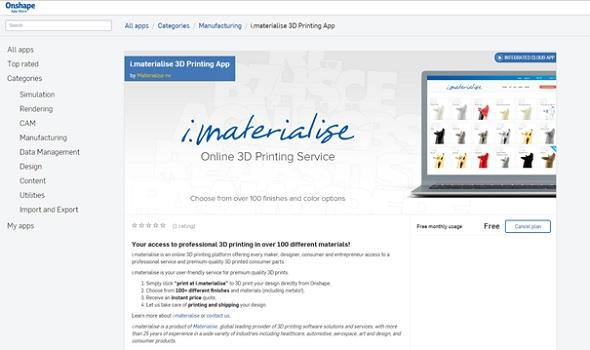
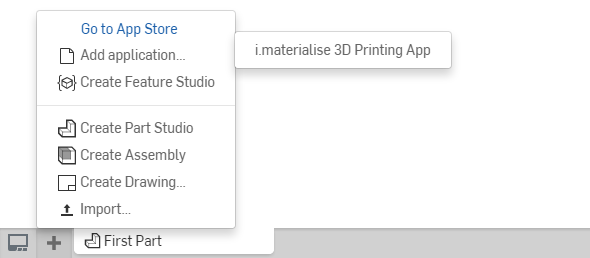
The plugin can be downloaded here. It’s simple to install: click the “subscribe” button on the right-hand side of the page, and you’ll be prompted to sign in to your account if you haven’t already. Confirm that you do indeed want to download the plugin by clicking “get for free,” and then re-enter your password. Done! Once you leave the app store, open a new Onshape document and click on the + sign in the lower left-hand corner. Choose “add application” and then “i.materialise 3D Printing App,” and you’ll be taken to i.materialise’s 3D printing process page.
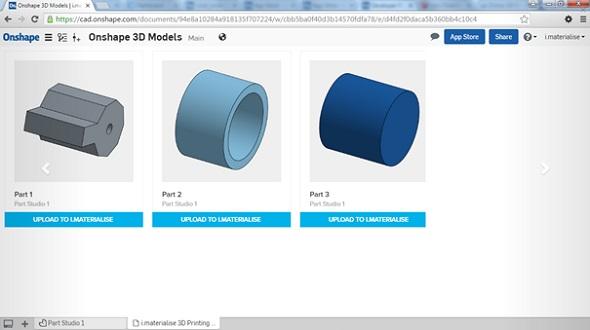
 The first time you use the app, you’ll be asked if you want to allow i.materialise to access your Onshape account. Of course you do, because you downloaded the thing, so click “authorize application” and thumbnails of your model or models will appear on a new tab. Click “Upload to i.materialise” beneath the model you want to work with, and the model will – that’s right – upload to i.materialise. From there, you can choose from the more than 100 materials and finishes offered by i.materialise, get your price quote, place your order, and they’ll print it and ship it to you.
Okay, now you’re done. For regular users of Onshape, the time saved with a plugin like this one adds up quickly. There seems to be a current trend of design software companies and 3D printing platforms working together to connect their services, which is undoubtedly much-appreciated by professional users working under strict deadlines.
So that’s that – it’s a simple application from two companies that pride themselves on simplifying things for their users, and it should save some headaches for stressed-out designers. Plus, it’s free, and you can’t argue with that. So give it a try, Onshape users, and streamline your workflow even more than it already is. Discuss this new app further over in the Onshape & i.materialise 3D Printing App forum at 3DPB.com.
Subscribe to Our Email Newsletter
Stay up-to-date on all the latest news from the 3D printing industry and receive information and offers from third party vendors.
Print Services
Upload your 3D Models and get them printed quickly and efficiently.












You May Also Like
Reinventing Reindustrialization: Why NAVWAR Project Manager Spencer Koroly Invented a Made-in-America 3D Printer
It has become virtually impossible to regularly follow additive manufacturing (AM) industry news and not stumble across the term “defense industrial base” (DIB), a concept encompassing all the many diverse...
Inside The Barnes Global Advisors’ Vision for a Stronger AM Ecosystem
As additive manufacturing (AM) continues to revolutionize the industrial landscape, Pittsburgh-based consultancy The Barnes Global Advisors (TBGA) is helping shape what that future looks like. As the largest independent AM...
Ruggedized: How USMC Innovation Officer Matt Pine Navigates 3D Printing in the Military
Disclaimer: Matt Pine’s views are not the views of the Department of Defense nor the U.S. Marine Corps Throughout this decade thus far, the military’s adoption of additive manufacturing (AM)...
U.S. Congress Calls Out 3D Printing in Proposal for Commercial Reserve Manufacturing Network
Last week, the U.S. House of Representatives’ Appropriations Committee moved the FY 2026 defense bill forward to the House floor. Included in the legislation is a $131 million proposal for...