RepRapWeb Launches in Beta – Web-Based 3D Printer Control Software With Built-In Slicing

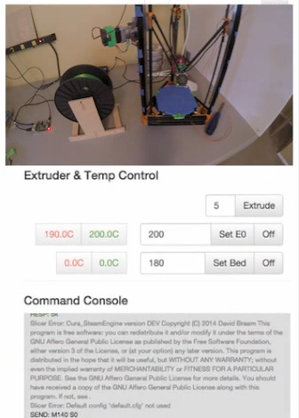 Seldom do those without 3D printing experience, and even some of us who are experienced, realize just how much computing takes place behind the scenes of a typical 3D print. Every single motion of the extruder is defined by code, telling it the exact coordinates. Extrusion temperature, print speed, auto-leveling, and calibration are all additional aspects of a typical print project which must be defined in order for an object to be fabricated error free.
Although there are programs out there which do much of this for you without the need to think much about it, sometimes having access to the actual command center for the printer, and the ability to control the printer’s every movement and action, is something that’s nice to have at your fingertips.
XYZBots, an organization with a mission to provide free software for motion control systems, such as their web-based CNC controlled software called GRBLWeb, has just released a beta version of a new software for 3D printing they call RepRapWeb. The software, which can be used with RepRap as well as other 3D printers out there, provides a very thorough command and control panel for the print process. Some of the features included in this software are:
- Ability to run on Raspberry Pi, and be controlled from any computer anywhere
- Completely free, licensed under the Affero General Public License (AGPL)
- Slicing Software included. Use CuraEngine or Slic3r to convert .STL files into GCODE
- Fast – Quick and responsive interface, almost immediate slicing with CuraEngine
- Wireless Networking
- Control of multiple printers from the control board
- Complete printer control – Set and view temperatures, control the auto-leveling process if your printer supports this feature, pause and unpause your prints in real time, and control the exact movements of the extruder
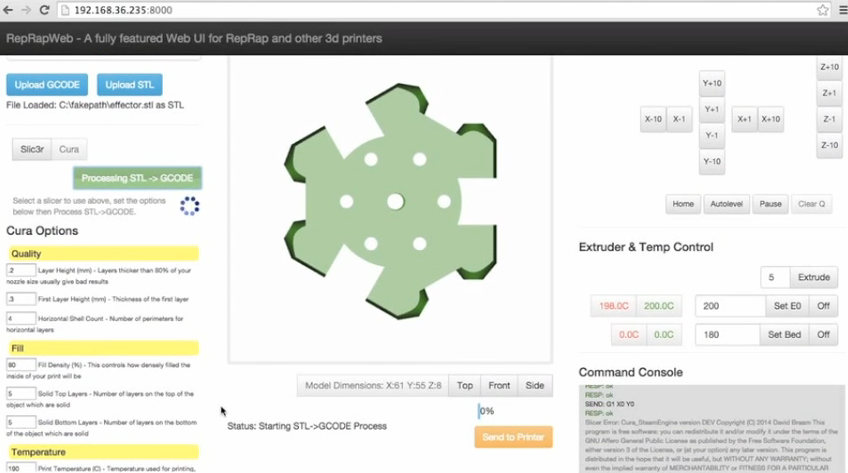
This software will easily provide users with full control over their 3D printers, whether they are in the same room as the machines or much farther away. As you can see from the video provided below, the user interface is quite simple and pretty much self explanatory. The complete installation instructions for the RepRapWeb software can be found here.
Please note that this is only a beta release, meaning their could still be glitches within the software. Any feedback, problems or complaints may be posted in the XYZBots Google Group or in the RepRapWeb forum Thread on 3DPB.com. A software demonstration video is provided below:
Subscribe to Our Email Newsletter
Stay up-to-date on all the latest news from the 3D printing industry and receive information and offers from third party vendors.
Print Services
Upload your 3D Models and get them printed quickly and efficiently.










You May Also Like
StoneFlower 3D Launches Laboratory-Scale 3D Printer for Construction Materials
StoneFlower 3D has launched a new 3D printer designed for laboratory-scale research and development with concrete, mortars, clays, and other advanced mineral materials. The system is intended for researchers, designers,...
3D Printing News Briefs, February 7, 2026: Generative AI, USVs, Microgravity, & More
Today’s 3D Printing News Briefs is a bit of a mixed bag. We’re starting with generative AI tools for 3D design from MIT, and then news about USVs. Moving on,...
Breaking the Bottleneck: How Automated Post-Processing Is the Key to Scalable Dental 3D Printing
The dental industry has undergone a dramatic transformation over the past decade. Traditional fabrication methods, such as manual casting, milling, and hand finishing, are being steadily replaced by digital workflows...
3D Printing News Briefs, February 5, 2026: Advisory Board, Virtual Twins, & More
We’re starting with business in today’s 3D Printing News Briefs, including a new website launched by Metamorphic AM. Massivit appointed two senior leaders to its advisory board, and Dassault Systèmes...