Ponta Scan Software: Professional Quality Scans from Household 3D Scanners


 The tech and 3D printing worlds sure love their Kickstarter campaigns, and what’s not to love? From virtual reality 3D design software, to 3D printed robots and 3D printed tools, to 3D printers themselves, the extremely popular crowdfunding platform states that their mission is to “help bring creative projects to life.” Tens of thousands of innovative projects have come to fruition through the help of a Kickstarter campaign, and over 10 million people, from every continent on our planet, have backed a Kickstarter project. That’s a huge community of people focused on helping good ideas get off the ground. Now, another one of those good ideas needs your support to become a reality.
 The new Ponta Scan software, from Japanese creative software developer Ponta Lab, just launched a Kickstarter campaign. Ponta Scan offers you the chance to bring professional 3D scanning capabilities right into your home. It’s an ingenious idea: the software, for Windows, takes the raw 3D scanning data from a less expensive household scanner, like a handheld XYZPrinting 3D Scanner, and easily turns it into professional-quality, high resolution data. Just Scan, Ponta, Print!
Masakazu Inaba, the developer of Ponta Scan, first came up with the idea to turn a regular consumer 3D scanner into a high precision one in January, due to his frustration with his own 3D scanner’s poor resolution and inability to handle complex shapes. He developed the prototype over the next four months, and released the Japanese beta version, while continuing the product’s precision tuning, in June. The Kickstarter campaign runs through January 10, 2017, with reward fulfillment in February and any necessary performance updates being completed in March. For a pledge of just $100, you will receive a digital download of the Ponta Scan software!
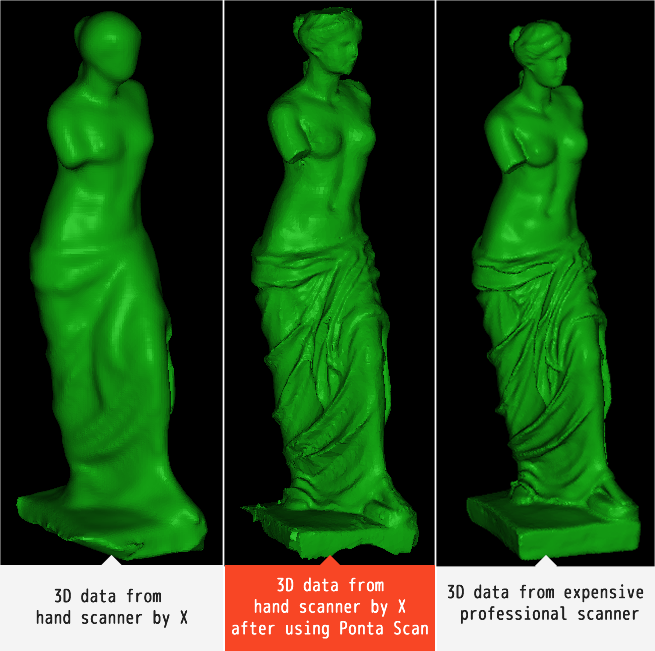 Ponta Scan wants to take your next project from ordinary to extraordinary. This revolutionary new 3D processing technology turns the data you scan in your living room, whether it’s a small object of only a few centimeters, or something big, like a statue, into high precision data that looks as though it came from a machine that costs thousands of dollars. It is important to note that the Ponta Scan software does not come with a hand scanner.
The software is easy to use, too! Once you download it, and have the object you want to scan ready, just push the “Start” button. The scanning will begin in five seconds, and there’s even a handy onscreen countdown timer! Scan the object slowly, from all angles, and just press “Stop,” or face the scanner away from the object, to finish scanning. Data from the different angles will be automatically converted to high-res 3D data. Once it’s all processed, your model will pop up on the screen; you can even see it in color if you want! Then, 3D print your scan to your heart’s content!
 Ponta Scan is compatible with hardware that has either Intel RealSense F200 or Intel RealSense SR300 built-in. The scanning size range is from about one inch to roughly six and a half feet. If you’re curious about the meaning of the name ‘Ponta,’ just ask their leader!
Check out a video (including an overly-dramatic dramatization) about the Ponta Scan Kickstarter campaign below:
Discuss in the Ponta Scan forum at 3DPB.com.Podcast: Play in new window | Download
Subscribe to Our Email Newsletter
Stay up-to-date on all the latest news from the 3D printing industry and receive information and offers from third party vendors.
Print Services
Upload your 3D Models and get them printed quickly and efficiently.









You May Also Like
3D Printing News Briefs, August 20, 2026: Metal Powders, Patent Infringement, Scanners, & More
We’re starting with metal 3D printing business news in today’s 3D Printing News Briefs, as SBO is expanding its capacity in the US and the UK, and Continuum Powders is...
Haddy’s Continued Attention to 3D Printed Drone Boats Shows Why It’s Becoming a Legit Dual-Use Contender
At some point last year, I stumbled across what has been, for me, the most valuable explanation of what ‘dual-use’ means, in this War on the Rocks article from January 2025, whose...
PanOptimization Gets Attaboy from AFRL for PanX Software
Published in the International Journal of Advanced Manufacturing Technology, a paper titled “Part scale prediction of residual stress through thermomechanical modeling of additively manufactured Ti-6Al-4V” seems to point to the...
Austal, Curtin University and AMCRC Work on R&D Together
Australia’s Additive Manufacturing Cooperative Research Centre (AMCRC) works with 70 industry partners to deliver collaborative R&D projects. They also work on workforce development and technology transfer. It’s kind of analogous...