3D Systems: Enjoy Powerful, Reliable Results with New 3D Inspection Capabilities in Geomagic Control X Software


 One would have to wonder how far the world of 3D Systems Geomagic software can possibly expand. Meant to offer greater capabilities to the user in terms of 3D design and workflow overall, 3D Systems has certainly kept their designers updated—with a long list of releases and new features, from Sculpt 3D Modeling software and the Touch Haptic Stylus to better Scan to Design Workflow and a recent release allowing for integration of Geomagics into Solidworks with convenient scanning.
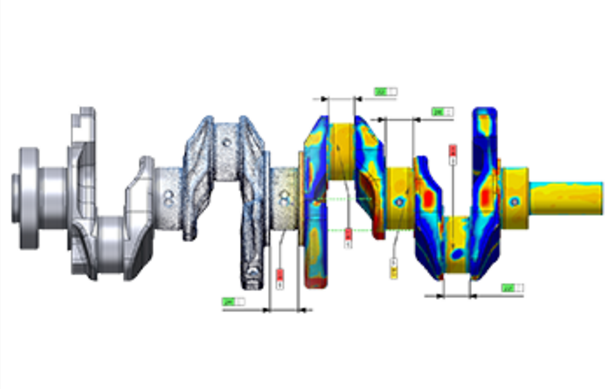
 The latest announcement marks a more complex release for users, with the availability of Geomagic Control X software for 3D inspection and metrology. This software is meant for quality management and metrology workflows within a results-driven environment where fast, precise digital inspection is required. A new set of thorough and innovative tools are provided with an intuitive software for professional metrology.
According to 3D Systems, Geomagic Control X is both accurate and traceable, and offers tools for reporting and analysis that can be customized for quality assurance.
“Geomagic Control X builds on our 20-year legacy of top-grade inspection software development to introduce the world’s best-in-class metrology software,” said Scott Green, Director of Product Management, Software Solutions, 3D Systems. “The outcome is an easy-to-use solution that answers the measurement analysis requirements of manufacturers worldwide.”
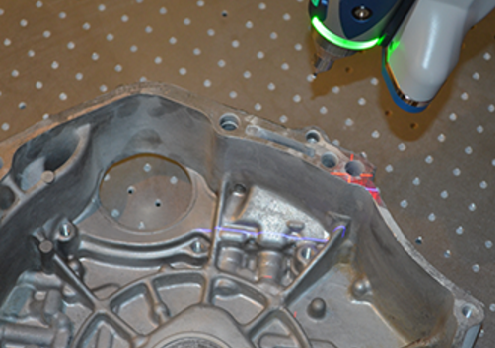
With this inspection software, you will understand your results every time.
The update is available to you if you are an active customer in the 3D Systems’ Maintenance Program, offering the following features:
- New Synchronous and Assembly Inspection tools: Now, you can expand inspections to cover comprehensive product assemblies with the enabling of rapid, precise, unordered inspection. The software offers editable, history-based inspection trees for repeatable inspections automatically.
- New User Interface: This feature has been ‘refreshed’ so that users can locate it more quickly and easily, enjoying the range of options available for both measuring and analyzing parts.
- New Walk-up Probing for greater productivity: Geomagic Control X now enables walk-up probing alongside pre-planned probing for fast generation of results every time.
- Improved CAD-Aware Dimensioning, Product and Manufacturing Information (PMI) Support and Comprehensive Geometric Dimensioning and Tolerancing (GD&T) Callouts: Intuitive dimensioning based on CAD features delivers even better efficiency while both advanced PMI and GD&T support facilitate results interpretation to keep all stakeholders on the same page.
- New Multiple Results Analysis: Simultaneous analysis using multiple results and mating parts means users are able to look forward to faster comparison, analysis and understanding of root causes behind existing production issues.
- New Custom Report Definition: Putting together specialized and unique data sets is both fast and easy to do with highly flexible report definition.
- Repeatable Probing Processes with LiveInspect: Geomagic Control X allows you to pre-plan your inspection processes and reporting for portable CMMs, and execute them at a later date, over and over, building repeatability and reliability into your inspection processes. All industry-standard non-contact and optical scanners, and a wide range of portable probing and tactile devices, are supported.
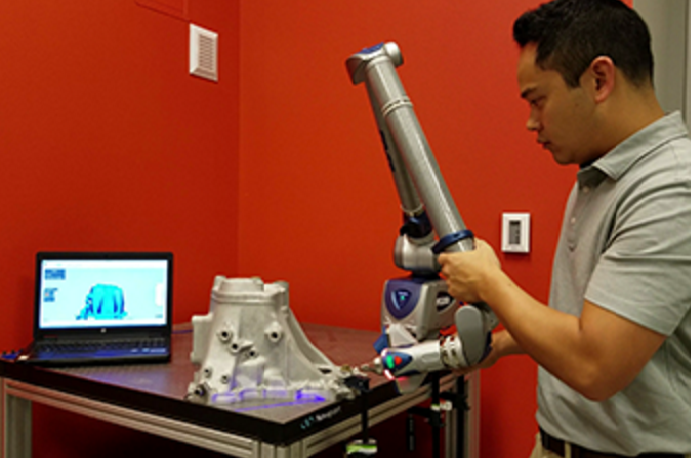
“Geomagic Control X is by far the most intuitive and powerful inspection software we have ever used,” said James Earl, Managing Director of OR3D. “We are excited for the improvements this software will bring to our customers.”
The software imports all major CAD file formats, including CATIA, NX, Creo, Pro/ENGINEER, SOLIDWORKS, Solid Edge, Autodesk Inventor, and more, in addition to PMI and GD&T data. All CAD importers are delivered at no additional cost. Discuss further in the Geomagic Control X 3D Software forum over at 3DPB.com.
Subscribe to Our Email Newsletter
Stay up-to-date on all the latest news from the 3D printing industry and receive information and offers from third party vendors.
Print Services
Upload your 3D Models and get them printed quickly and efficiently.










You May Also Like
The Two Paths to AM Print Services Market Growth
AM Research New market research: AM Research is building its new Additive Manufacturing Services Market 2.0 model. Learn more about the report and preorder here → Things continue to heat...
Additive Manufacturing Has a Major Growth Opportunity; Trust Will Decide Who Captures It
After years of overpromising, the next phase of AM growth will be won by companies that consistently deliver what they say. When I entered additive manufacturing in 2014, after 15...
10 Years of Multi Jet Fusion: Onsite at HP’s Vancouver, Washington Facility
At this year’s RAPID event in Boston, HP Additive Manufacturing Solutions celebrated ten years in the additive manufacturing (AM) market. The company ushered in the milestone with several innovations, including...
ADDMAN to Buy Up to $10.8M in Nickel 718 Powder from 6K Additive Over 30 Months
After years of buildup, we’re finally starting to see what the US metal additive manufacturing (AM) market could look like at scale. To be sure, it’s still not quite there,...