Check Out This i.materialise Tutorial on Making A 3D Printed Action Figure

There appears to be quite a distinctive overlap between 3D printing and action figures. For example, DC Comics has signed deals to 3D print some of its more popular action figures — including the world’s first official 3D printed Batman. This is awesome news for Europe’s Batman fans, who now have the option to 3D print their own figurine based on Christopher Nolan’s Batman Begins film. But for those who are into designing their own action figures, which is likely to include designers drawn to 3D printing because of its customization potential, i.materialise has recently offered a tutorial that outlines how to do this.
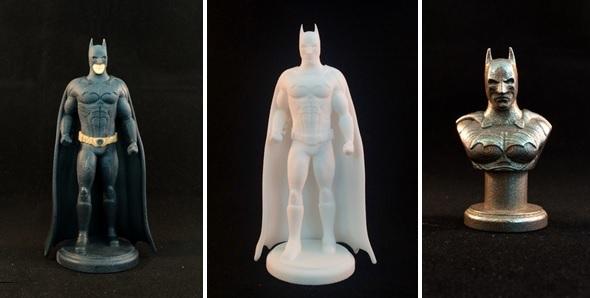
Here, i.materialise indicates that CAD software won’t be much help because the parts will be “too edgy and non-organic.” But the good news is that there are plenty of other software programs out there which will be a big help for digital sculpting your own action figure. These include Sculptris, which is a very user-friendly program that provides a positive first time digital sculpting experience. (The other good news is that it’s free!) Meshmixer, from Autodesk, is also free. Fabian from i.materialise explains more about Meshmixer here:
“While the sculpting tools don’t really hold up to those of Sculptris, Meshmixer is perfect for preparing your model for 3D printing. That’s why many 3D artists work with several programs and use Meshmixer to give their model the ‘finishing touches’ before it goes to the printer.”
Beyond Sculptris and Meshmixer, ZBrush is the digital sculpting tour-de-force. Powerful and widely used by professionals, ZBrush is also manufactured by Pixologic, which makes Sculptris. ZBrush offers a much wider range of tools, but look out. The program has a steeper learning curve than the others listed here. Cinema4D, MODO, and Blender all have sculpting modules, but they are also not originally intended for digital sculpting usage, so some features are lacking here that you may need.
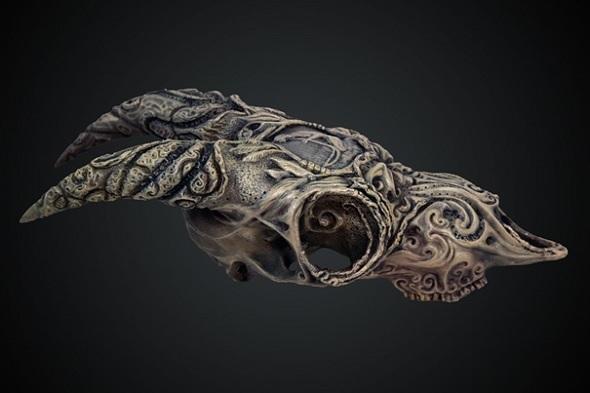 Keep in mind that you don’t need to create a figure file from scratch. You can import 3D scans and files from the web, too. Here’s a link to the top 3D model databases — according to i.materialise. For human 3D characters, MakeHuman is an open source tool intended just for this purpose; you can then use ZBrush or Meshmixer to edit your human-like action figure too, cleaning it up for printing.
If you are interested in starring as your own action figure, and I am sure many of our readers just might be, then unless you have access to a high-end 3D scanner made for a job like this, i.materialise has several other cheaper scanning options:
“High-end scanning software can easily cost thousands of dollars – but there are cheaper alternatives. On the one hand you could get yourself scanned (yep, there are services for that), or you could try to get a scan with a free app on your smartphone. Creating a decent 3D scan with a smartphone (or camera) is a bit trickier and may take a few attempts, but we’ve had quite a few positive experiences already.”
i.materialise goes on to recommend that you can always try free scanning software like 123D Catch, but if you do, make sure you clean it up in Meshmixer or follow this tutorial that explains how to use ZBrush before you 3D print your file.
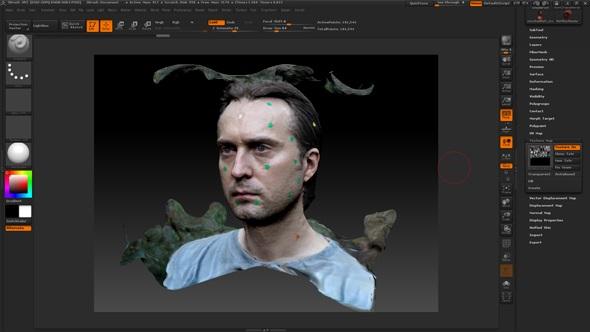
You can continue to read here about how to 3D print your figure, ranging from which materials to use and file preparation. Or, you can always opt for a professional 3D printing service simply by uploading your file to i.materialise here. Discuss your ideas over in the 3D Printed Super Hero Tips forum at 3DPB.com.
Subscribe to Our Email Newsletter
Stay up-to-date on all the latest news from the 3D printing industry and receive information and offers from third party vendors.
Print Services
Upload your 3D Models and get them printed quickly and efficiently.









You May Also Like
Foundation Alloy Raises $22M in Series A for Solid State Molybdenum
Foundation Alloy has just raised $22 million in Series A financing. The alloy company is trying to create a platform that will enable the solid state manufacturing of alloys. In...
Aerospace Giant IHI Bets on Freemelt E-Beam 3D Printing for Next-Gen Turbine Alloys
IHI Europe has purchased a Freemelt electron-beam powder-bed fusion (E-PBF) system. Previously, parent IHI bought two Freemelt systems, bringing the total to three. IHI is a Japanese engineering conglomerate. The...
Goldilocks’ Flywheel: Refractory Complex Concentrated Alloys (RCCAs) & The Race for the Future
Recently, Metalysis, Skyrora, and Thermo-Calc Solutions started to try to commercialize Tanbium. This alloy has been created for use in combustion chambers and rocket nozzles. Tanbium is a Refractory Complex...
3DPOD 236: AM Materials Science & Applications with Nick Sonnentag, Sunnyday Technologies & Oshkosh Corporation
Nick Sonnentag is a Senior Principal Engineer at Oshkosh, where he contributes to the development of some of the world’s toughest vehicles using additive manufacturing (AM). Drawing on experience from...