Microsoft and 3D Systems Team up to Offer a Cloud Based Printing Solution via the 3D Builder App


 Back in November of last year, Microsoft enter the 3D printing space from a software standpoint. This is when they announced the release of the 3D Builder application for Windows 8.1 machines. Although a small step into the realm of 3D printing for Microsoft, there was little doubt, at least for me, that this was the precursor to a more elaborate plan for the software giant to capitalize on the emerging market.
Today another step, this time a bit larger, has been taken in Microsoft’s jog towards a more expansive role within the industry. They have just announced an update to their 3D Builder application, with the release of 3D Builder App R5, an update which is sure to get the attention of the larger players within the 3D printing space.
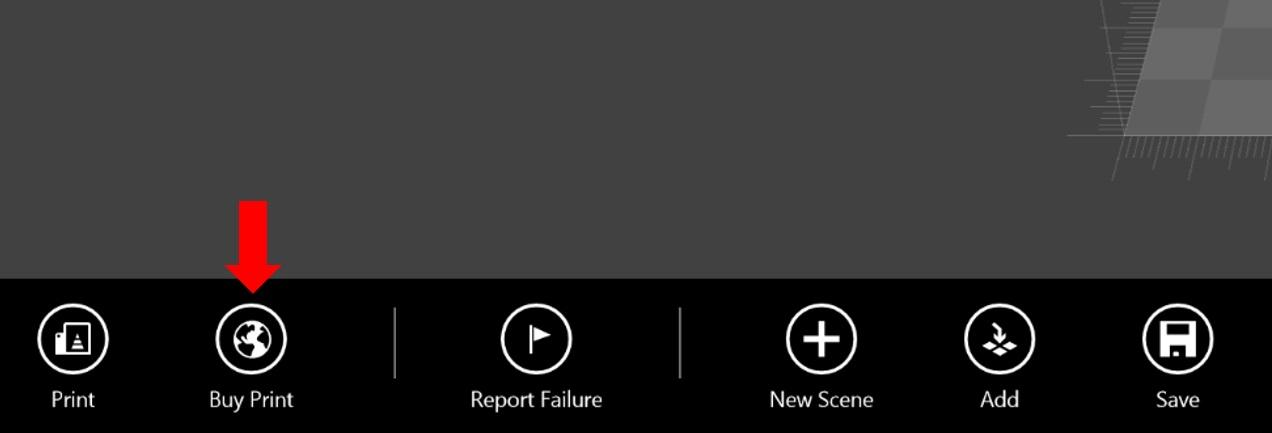
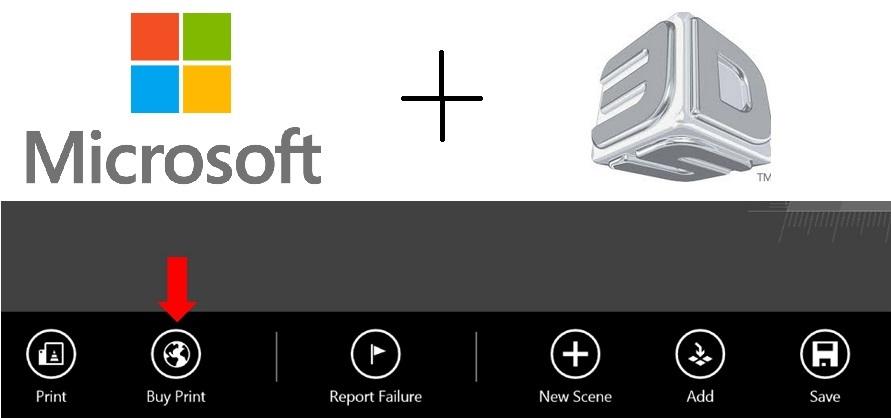
This latest release, which includes an exhaustive list of changes, most notably features a new ‘Buy Print” button within the 3D editing window. Through a partnership with 3D Systems’ Cubify service, Microsoft will enable users of this free application to seamlessly order a 3D print of whatever design they have created. This service is targeted towards designers who do not have access to a 3D printer, or who wish to access an expanded number of materials by which their designs can be fabricated with.
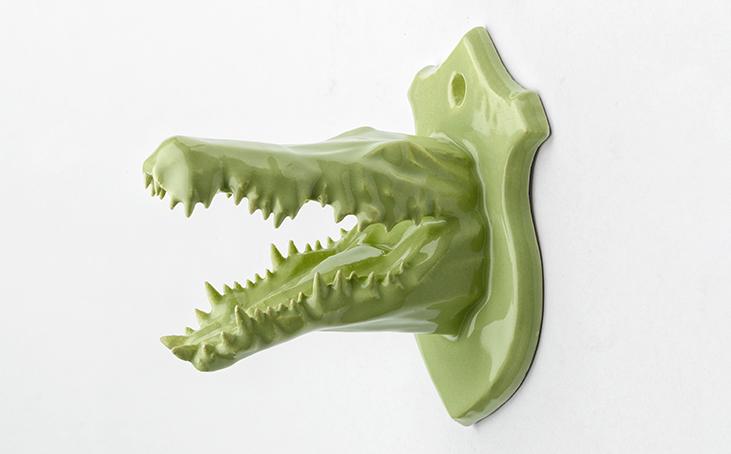
A Ceramic 3D Print via Cubify
Included in the material options offered by Cubify, are opaque and frosted plastics, metallic and mixed plastics, full-color “Colorstone” and even ceramics. Once a print is ordered, it will take approximately 2 weeks for 3D Systems to ship it to your doorstep. Further details on Cubify’s offerings may be found here.
Like mentioned above, this is only one of the many updates we have seen within the new 3D Builder App R5 release. Below are just a handful of the other important changes within this latest update:
- Ability to save files as .STL
- Overhauled main control, new selection control
- New trophy parts for 3D models
- Windows RT support
This is certainly very exciting for the industry, as Microsoft has just become a partner in providing 3D printing services via their free Windows 8.1 application. 3D Systems may have hit the jackpot in agreeing to this partnership with the worlds largest software company. There is no doubt that others within the 3D printing space, as well as those competing with Microsoft are paying attention to this interesting move.
Do you use the 3D Builder application? Have you downloaded the latest version? What could this mean for the 3D printing industry in general? Discuss in the Microsoft / 3D Systems partnership forum thread on 3DPB.com. Below is a video overviewing some of the more importanted changes within this release:
Subscribe to Our Email Newsletter
Stay up-to-date on all the latest news from the 3D printing industry and receive information and offers from third party vendors.
Print Services
Upload your 3D Models and get them printed quickly and efficiently.









You May Also Like
3D Printing News Briefs, May 28, 2026: Continuous Fiber Reinforcement, Bioprinted Trachea, & More
In today’s 3D Printing News Briefs, America Makes announced the winners of its JAQS-SQ Project Call. Axtra3D is partnering with Keystone Industries to expand its dental material ecosystem, while BigRep...
3D Printing News Briefs, March 21, 2026: Resin Safety, 3D Printed Bandages, & More
We’re kicking off this weekend’s 3D Printing News Briefs with some America Makes project call news, and then moving on to resin safety myths. We’ll end with a 3D printed...
New Materials and Curing Unit at Formlabs
Formlabs is showcasing new SLA materials and a new curing solution. The new Tough 1000 Resin, with a tensile modulus of 1000, a Tough 1500, and an improved Tough 2000...
3D Printing News Briefs, October 25, 2025: Strategic Investment, Inner Ear Organoids, & More
In this weekend’s 3D Printing News Briefs, we’ll start off with some business news, as Xact Metal announced continued double digit growth in Q2 and Q3 of 2025, and the...