

“The use case is simple,” Průša explains. “3D printing is always about the quality versus the print time.”

Perfect control with accurate shader layer visualization before slicing
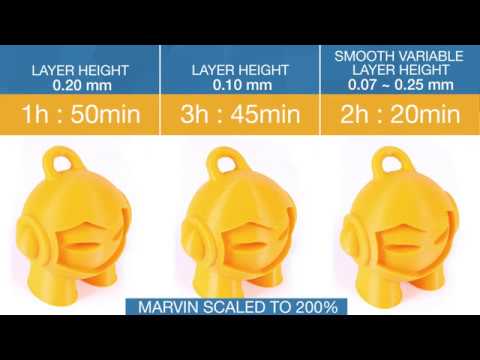
In order to illustrate how the new Smooth Variable Layer Height feature works, a 200% scaled up 3D Hubs Marvin is used as an sample object. It takes nearly two hours to print Marvin with a 0.2 mm layer height, which isn’t terribly long. The issue is that the top of his head gets that staircase effect mentioned earlier. You can fix this by printing Marvin at a 0.1 mm layer height, but then the print time doubles, going up from 1 hour 50 minutes at 0.2 mm to 3 hours 45 minutes. If one were to print Marvin at 0.05 mm, it would take about 8 hours total!
Luckily, with the new Smooth Variable Layer Height feature, you can combine the layer height and total print time, just by selecting your object in the Plater tab and choosing Layer Editing from the top menu. This allows you to essentially “paint” which parts of the object you want to add more detail to; in the case of Marvin, the top of his head. The green parts will automatically default to 0.07 mm, which gradually smooths the selected layer.

3DHubs Marvin with more detail added on the top of his head and smooth transition
According to Průša, this smoothing is not present in any other slicing software for FFF 3D printers, but is extremely important, so the layer height jump won’t be so visible for 3D printed objects. You can even print a different part of your object, in this case, Marvin’s legs, at a different layer height, to speed things up even more. By spending less than three hours tweaking the g-code, Prusa was able to cut the overall print time by 1 hour 25 minutes, with the same result!
Click here to download the pre-configured Slic3r Prusa Edition.

Something else new that’s been added to the Slic3r Prusa Edition is a helpful “Slicing Info” box, which appears after the G-code is generated. In the box, you can see the amount of filament used for a print, how much it costs, and some other helpful information as well. While some work on parallelization was done in this latest release, Průša said that will be the major focus for the next one – so stay tuned! Discuss in the Prusa forum at 3DPB.com.